Check Your PNP Payslip OnlineStep by Step Guide 2026
View your monthly payslip online through the official portal. Check your basic salary, allowances, deductions, and take-home pay, then download or print it anytime. The system is free, simple, and available 24/7.
✓ 24/7 Access
✓ Free to Use
✓ Any Device
Overview
What Is a PNP Payslip?
A PNP payslip is a digital document that shows a police officer’s complete salary details for a specific pay period. It breaks down your basic pay, allowances, deductions, and your actual take-home pay after everything has been calculated.
Before the online system existed, officers had to wait for physical copies to be distributed through their unit, which was slow and easy to lose. Now all of that information is available online through the PNP payslip portal at payslip.pnppms.org. You can check any month, download a copy, or print it whenever you need it.
Who Can Access the PNP Payslip Portal?
Only active PNP personnel with a valid PNP ID number can register and use the portal. If you are currently serving in the Philippine National Police, you are eligible to create an account and access your payslip records.
Retired officers and civilian employees do not have access to this system. If you are a retired PNP officer and need your salary records, contact your unit’s finance office directly for assistance.
Two Types
Types of PNP Payslip
PNP personal receive two types of payslips. Both are accessible through the same portal.
Regular Monthly Payslip
Covers your standard salary for the month including base pay, deductions, and allowances.
Additional Compensation Payslip
Covers any extra pay you receive on top of your regular salary such as special allowances or additional financial benefits.
Registration
How to Register for the PNP Payslip Portal
If you have never logged in before, you need to create an account first. Here is how to complete your PNP payslip online registration.
1
Go to the official website
Open the official PNP payslip website at payslip.pnppms.org.
2
Click registration or sign-up
Click on the registration or sign-up option on the homepage.
3
Fill in your personal details
Enter your full name, address, phone number, and PNP ID number.
4
Create a strong password
Use a mix of uppercase and lowercase letters, numbers, and symbols. Something like Pnp2026@ph is much harder to guess than a simple word.
5
Submit and check your email
Submit the form and check your email for an activation link.
6
Activate your account
Click the link to activate your account. Once active, you can log in anytime using your PNP ID and password.
login
How to Log In to the PNP Payslip Portal
Once registered, logging in to the PNP payslip portal is straightforward.
1
Visit the portal
Go to payslip.pnppms.org.
2
Enter your PNP ID
Enter your PNP ID number or registered email address.
3
Type your password
Enter your account password.
4
Complete the CAPTCHA
Complete the CAPTCHA verification.
5
Click login
Click the login or sign in button to access your dashboard.
View Payslip
How to Access and View Your PNP Payslip Online
After logging in, here is how to find and view your payslip.
1
Find the Payslip menu
Look for the menu option labeled Payslip or e-Payslip on your dashboard.
2
Open the payslip section
Click on it to open the payslip section.
3
Choose the pay period
Use the dropdown menu to choose the month or pay period you want to check.
4
View the payslip
Click View Payslip to open that month’s salary details. From there you can read it on screen, download it as a PDF, or print it directly.
view and DOWNLOAD
How to Print Your PNP Payslip
Many officers need a printed copy for loan applications, official submissions, or personal records. Here is how to do it.
1
Open the month you need
Log in to your account and open the payslip for the month you need.
2
Click Print or Download
Click the Print or Download button on the payslip page.
3
Save a PDF backup
If you want a digital backup first, save it as a PDF to your device.
4
Print from the PDF
Open the saved PDF and print it from there using any printer.
Breakdown
What Is Inside a PNP Payslip
Your PNP payslip is divided into four main sections.
Employee Information
Shown at the top, with your personal and job details: full name, badge number, rank, unit code, date of birth, date of entry to service, retirement date, account number, and the pay period the slip covers.
Earnings
Everything you earned before deductions. It typically includes:
- Base pay
- Long pay
- PERA (Personnel Economic Relief Allowance)
- Hazard pay
- Clothing allowance
- Laundry allowance
- Incentive pay
- Quarter allowance
- Any other applicable allowances
Deductions
Common deductions include:
- PhilHealth contributions
- Pag-IBIG contributions
- Withholding tax
- GSIS or AFPSLAI loan payments
- PSSLAI contributions
- Other authorized deductions
Net Salary
It shows your first salary release, your second salary release, and your total net take-home pay after all deductions have been applied.
Decoded
Understanding Your Deductions
A lot of officers see unfamiliar codes on their payslip and are not sure what they mean. Here is a quick explanation of the most common ones.
PhilHealth: A monthly health insurance deduction that helps pay for hospital bills and medical expenses for you and your dependents.
Pag-IBIG Fund: A housing fund contribution that gives you access to housing loans, savings, and other member benefits.
Withholding Tax: The income tax automatically deducted from your salary based on how much you earn.
AFPSLAI: A savings and loan association for military and police personnel. The deduction goes to your savings account or loan payments.
PSSLAI: Another savings and loan association for PNP members where deductions are used for savings or loan repayment.
PMSMBFI: A PNP cooperative where deductions are used for membership contributions or loan payments.
SGTI: A deduction for a cooperative, insurance, or group benefit program depending on your enrollment.
Spot something wrong?
If you see a deduction you do not recognize or think an amount is wrong, do not ignore it. Bring it up with your finance office right away so it can be checked and corrected if needed.
Example
PNP Payslip Sample
Here is an example salary summary to help you understand how the numbers may look. Your actual salary details can be different based on your rank, length of service, loans, and current pay rates.
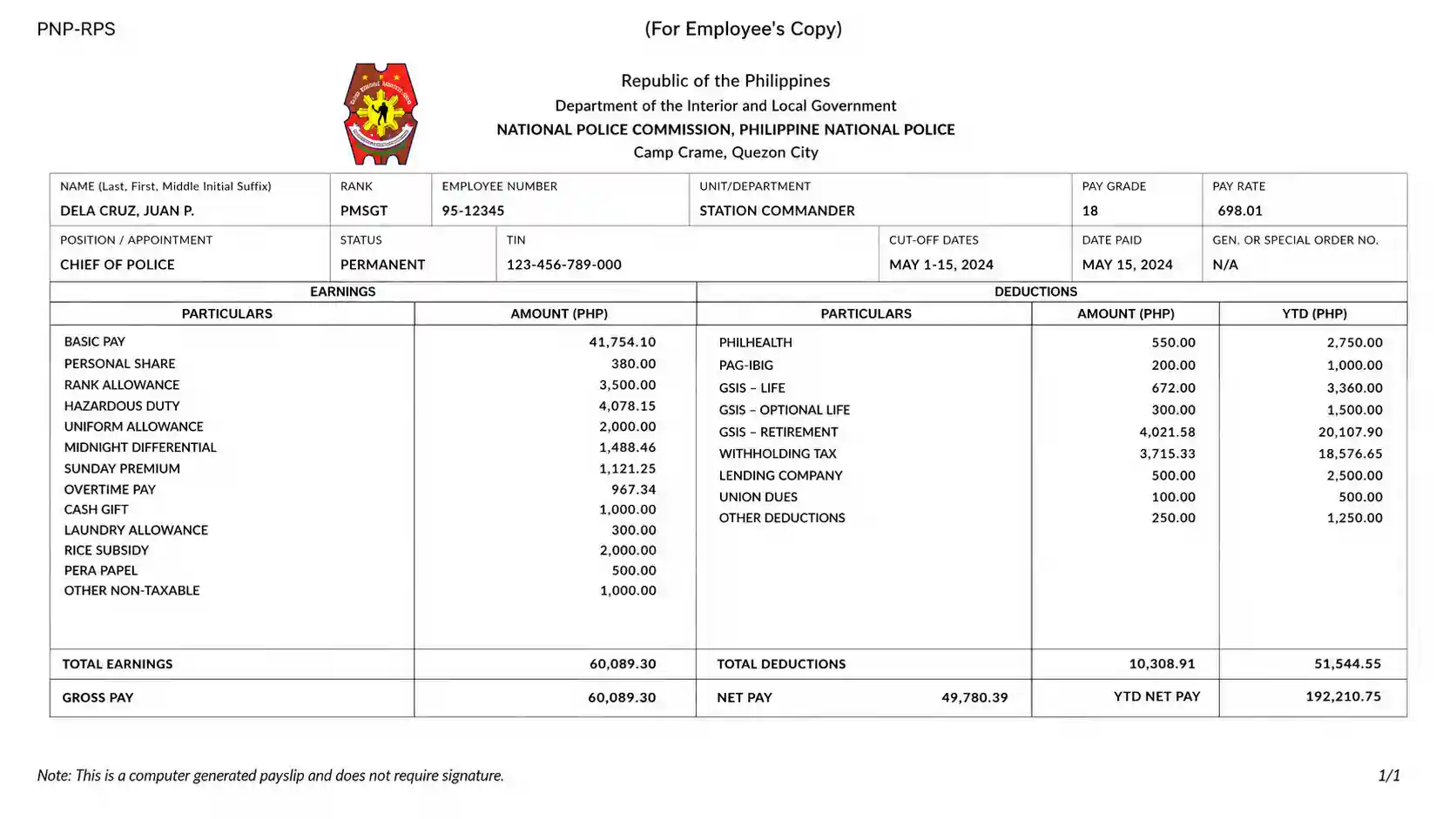
Earnings
| Earnings | Amount (PHP) |
|---|---|
| Base Pay | 34,761.00 |
| Long Pay | 16,133.00 |
| PERA | 2,000.00 |
| Hazard Pay | 540.00 |
| Clothing Allowance | 200.00 |
| Total Earnings | 54,164.00 |
Deductions
| Deductions | Amount (PHP) |
|---|---|
| PhilHealth | 477.96 |
| Pag-IBIG | 100.00 |
| Withholding Tax | 2,712.43 |
| AFPSLAI | 1,500.00 |
| PSSLAI | 8,000.00 |
| Other deductions | 6,313.63 |
| Total Deductions | 19,104.02 |
Net Pay Summary
| Net Pay Summary | Amount (PHP) |
|---|---|
| 1st Salary | 19,779.00 |
| 2nd Salary | 19,780.98 |
| Net Take-Home Pay | 35,059.98 |
Good to Know
Payslip QR Code and Account Number
Two useful features built into your digital payslip.
PNP Payslip QR Code
Your downloaded payslip includes a QR code linked to your official record in the PNP system. Employers, banks, and government offices can scan it to instantly verify that your payslip is genuine and has not been altered. This reduces fake or tampered documents and makes the digital copy as credible as any stamped paper document. For loan applications or any official requirement, the QR code version is the safest and most accepted format.
PNP Payslip Account Number
Your account number is 16 digits long. The first four digits represent your branch code. The next four represent the scheme code, where 0001 means a savings account and 0002 means a salary account. The remaining digits are your unique identifier within the system.
account RECOVERY
How to Reset Your PNP Payslip Password
Forgetting your password is very common, especially if you have not logged in for a while. Here is how to recover access.
1
Click Forgot Password
Go to payslip.pnppms.org and click Forgot Password on the login page.
2
Enter your email
Enter your registered email address.
3
Check your inbox
Check your inbox for a password reset link. If you do not see it after a few minutes, check your spam or junk folder.
4
Set a new password
Click the link in the email and set a new password.
5
Log back in
Log back in with your new password.
Note
If You Cannot Access Your Email
Email changes are not allowed online through the portal.
If you no longer have access to your registered email, contact your unit’s finance office for assistance since the portal does not allow email changes online.
Troubleshooting
Common Login Problems and How to Fix Them
A lot of officers run into the same issues when trying to access the portal. Here are the most common ones and what to do about them.
Account locked
This happens when you enter the wrong password several times in a row. Wait about 30 minutes and try again, or use the Forgot Password option to reset it.
Page not loading or error
Try clearing your browser cache and cookies first. If that does not work, switch to a different browser such as Chrome or Firefox. The portal can run slow during peak hours, so trying again later also helps.
Activation email not arriving
Check your spam or junk folder first. If it is still not there after 10 minutes, go back to the registration page and request a new activation link.
Login failing with correct password
Double-check that you are entering your PNP ID correctly. Some officers accidentally use their badge number instead of their PNP ID number. Also check that your caps lock is not on.
Forgot which email you registered with
Contact your unit’s finance office and they can help you retrieve your registered account details.
EXTRA SECURITY
How to Enable Two-Factor Authentication (2FA)
Adding two-factor authentication to your account is a smart move since your payslip contains sensitive financial information. Here is how to set it up.
1
Open Security Settings
Log in to your account and go to Security Settings.
2
Enable Two-Factor Authentication
Look for the Two-Factor Authentication option and click to enable it.
3
Get Google Authenticator
Download Google Authenticator on your phone if you have not already.
4
Scan the QR code
Click Show QR Code in the portal and scan it using the Google Authenticator app. The app will generate a one-time code every 30 seconds.
5
Enter the code at login
Enter that code whenever you log in as the second layer of verification.
6
Confirm it works
Log out and log back in to confirm everything is working properly. Once 2FA is active, even if someone gets hold of your password, they cannot access your account without the code from your phone.
Why It Helps
Benefits of the PNP Online Payslip System
Here is what the online system means for you.
| Benefit | What It Means for You |
|---|---|
| Available 24/7 | Check your payslip any time of day from any device |
| No lost documents | Everything is stored digitally so nothing gets misplaced |
| Accurate calculations | The system is automated so errors from manual processing are eliminated |
| Access to old payslips | Pull up any previous month’s slip whenever you need it |
| Completely free | No fees or charges for using the portal |
| QR code verification | Your downloaded payslip can be verified instantly by banks and employers |
Frequently Asked Questions
PNP Payslip FAQ
Quick answers to the most common questions about the PNP online payslip system.
Conclusion
The PNP online payslip system takes something that used to be slow and inconvenient and makes it genuinely easy. Once your account is set up, checking your salary details, understanding your deductions, and getting a copy for official use aall take just a few minutes. Set up two-factor authentication, keep your login details safe, and use the official portal every time. It is one of those government tools that actually works the way it is supposed to.